

Streamline Your Workflows with Our Automation AI Tool Stack
Introduction
In 2026, time is your most valuable asset. Founders, marketers, and creators spend hours on repetitive tasks, data entry, social posting, email follow-ups, report generation that could be automated with a few smart connections.
The best part?
Modern automation tools are now so intuitive, anyone can build powerful workflows without coding.
The Automation Wizards toolkit is your shortcut to eliminating busywork, streamlining operations, and focusing on high-value work like strategy, customer relationships, and growth.
These tools connect your apps, trigger actions automatically, and scale with your business.
Automate each Business Step
1. Zapier – Connect Everything, Automate Anything
Zapier
Zapier remains the gold standard for connecting 7,000+ apps without code. When a new lead fills out your form → Zapier creates a CRM record, adds them to your email list, and schedules a follow-up task.
Why it’s essential:
- Multi-step “Zaps” with logic (if/then conditions, delays, filters).
- Native AI actions for summarizing, classifying, or generating content.
- Works with every toolGoogle Sheets, Slack, HubSpot, Notion, Gmail, and more.
- Tables feature turns spreadsheets into powerful automation hubs.
Perfect for founders connecting CRMs, email tools, project management, and communication apps into seamless workflows.
→ Start with Zapier to connect your most-used apps and eliminate manual data transfer forever.
2. Make.com– Advanced Workflows Made Visual
Make.com
For complex automations, Make.com offers unmatched visual workflow design. Need to scrape competitor pricing weekly, format it into a Slack report, and email the sales team? Make handles it with drag-and-drop modules.
Power user features:
- HTTP requests, data parsing, and custom JavaScript.
- Advanced iterators, aggregators, and routers for sophisticated logic.
- Real-time data processing and error handling.
- Beautiful scenario visualizations for team handoff.
Use Make when Zapier feels too simple, but you still want visual, no-code power.
→ Build complex automations visually with Make.com’s advanced workflow builder.
3. n8n – Open-Source Automation for Power Users
n8n
n8n gives you Zapier-level simplicity with enterprise flexibility and self-hosting options. Perfect for teams handling sensitive data or wanting full control over their automations.
Why developers and agencies love it:
- 300+ native integrations plus custom nodes.
- Self-hosted or cloud deployment for data privacy.
- Advanced scheduling, webhooks, and API flexibility.
- Visual editor with code-level control when needed.
n8n scales from simple form-to-CRM flows to full ETL pipelines and custom API orchestration.
→ Run unlimited automations securely with n8n’s open-source power.
4. Airtable Automations – Database-Driven Workflows
Airtable
Airtable combines spreadsheet simplicity with database power, plus built-in automations that trigger when records change. New client in Airtable → automatically create Stripe invoice, Google Calendar event, and Notion project page.
Database automation superpowers:
- Triggers on record creation, updates, or specific field changes.
- Native integrations with 50+ tools including Slack, Google Workspace, CRMs.
- Conditional logic and multi-step sequences.
- Interface designers create forms and dashboards that trigger automations.
Perfect for client management, content calendars, project tracking, and inventory systems.
→ Automate your spreadsheets with Airtable’s powerful database automations.
5. Bardeen – Browser-Based AI Automation
Bardeen
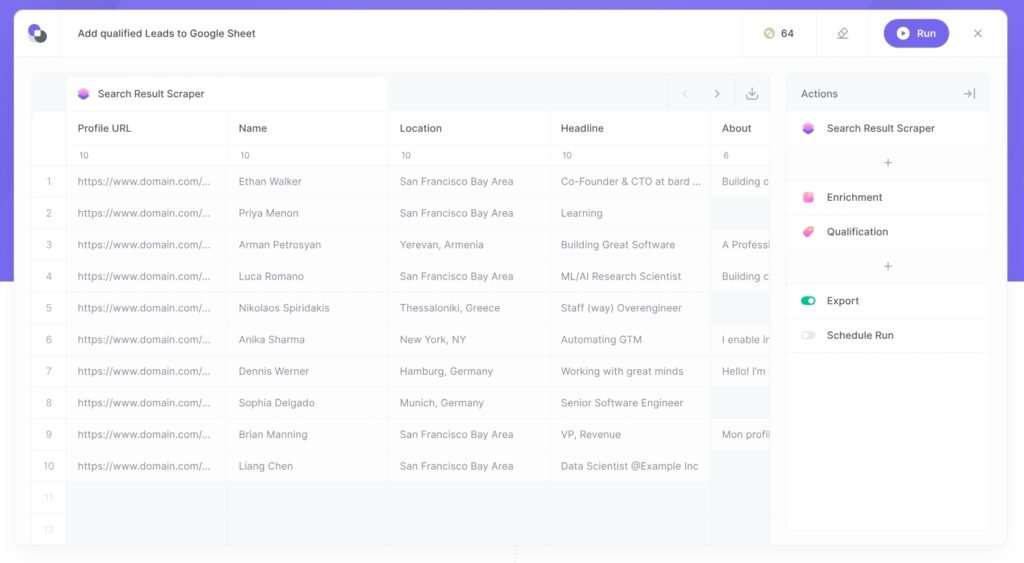
Bardeen lives in your browser and automates repetitive web tasks using AI. “Scrape LinkedIn profiles from search results and add to CRM” or “Find email addresses from any webpage” Bardeen handles it with one click.
Browser automation magic:
- AI-powered web scraping and data extraction.
- Pre-built “playbooks” for LinkedIn, Google Sheets, CRMs.
- Works across tabs and sites without extensions.
- Background automation runs while you work elsewhere.
Ideal for sales reps, researchers, and anyone tired of copy-pasting between websites.
→ Automate browser busywork with Bardeen’s AI-powered web assistant.
6. IFTTT – Simple Personal Automations
IFTTT (If This Then That) excels at simple, always-on automations for personal and small team use. “Save Gmail attachments to Dropbox” or “Tweet new Instagram posts automatically.”
Everyday automation:
- Applets connect 1,000+ services with one-click setup.
- Works on phone, web, and smart home devices.
- Location-based triggers and time schedules.
- Free tier handles most personal workflows.
Perfect for creators, solopreneurs, and household automations.
→ Set up simple automations instantly with IFTTT’s applet library.
7. Tray.ai – Enterprise Automation at Scale
Tray.ai
For scaling teams, Tray.io offers enterprise-grade automation with governance, compliance, and advanced orchestration. Think “when Salesforce deal closes, trigger accounting sync, customer success onboarding, and marketing attribution.”
Enterprise features:
- Full API connectivity and custom connectors.
- Workflow orchestration across departments.
- Role-based permissions and audit trails.
- Advanced error handling and retry logic.
Use Tray when your automations become mission-critical business processes.
→ Scale enterprise workflows with Tray.io’s professional automation platform.
8. Lindy – AI Agents That Think and Act
Lindy
Lindy creates autonomous AI agents that handle ongoing tasks like “monitor competitor pricing and alert Slack when they discount” or “follow up with leads who opened my email but didn’t reply.”
Agentic automation:
- AI agents learn and improve over time.
- Natural language workflow creation.
- Multi-step reasoning across apps and data sources.
- Human-in-the-loop for complex decisions.
The next evolution beyond simple if/then automation.
→ Deploy AI agents that handle ongoing tasks autonomously with Lindy.
9. Notion Automations – Team Workspace Magic
Notion’s built-in automations turn databases into workflow engines. “New database entry → notify Slack, create Google Doc, add to email nurture sequence.”
Database-driven power:
- Database triggers and property updates.
- Slack, email, and external app actions.
- Button trigger workflows for one-click processes.
- Templates for common workflows (onboarding, content approval, etc.).
Perfect for teams already living in Notion.
→ Automate your Notion workspace without leaving your team’s hub.
Bringing It All Together – Build Your Automation Command Center
Solo founder stack:
Zapier (main connector) + Airtable (client/projects) + Bardeen (web scraping)
Growing team stack:
Make.com (complex workflows) + n8n (self-hosted) + Notion (team hub)
Enterprise stack:
Tray.io (orchestration) + Lindy (AI agents) + Airtable (data)
Start simple: Pick one repetitive task wasting 30+ minutes weekly. Connect the two apps involved with Zapier. Experience freedom, then expand.
Reclaim Hours, Not Minutes
The Automation Wizards 2026 toolkit transforms how you work. What used to take hours manual data entry, follow-ups, reporting, research now happens automatically while you focus on strategy, customers, and growth.
You don’t need to automate everything at once. Start with one task that drains your energy most. Connect the apps. Watch it disappear from your to-do list.
That first win creates momentum and the realization that most of your repetitive work can vanish.
→ Pick one automation today and reclaim your time tomorrow. Your future self will thank you.
Find more Automation AI tools in Ai Stack directory >